Updating...
Skip to main content
(opens in a new tab)
Filter your search by category. Current category:
All
All
Knowledge Base
Service Catalog
Search the client portal
Search
Sign In
Show Applications Menu
Client Portal
Sign In
Search
Home
Services
Knowledge Base
More Applications
Skip to Knowledge Base content
Search
Articles
Blank
Knowledge Base
Web Conferencing and Telephony
Telephone: Set-up Mitel
Telephone: Set-up Mitel
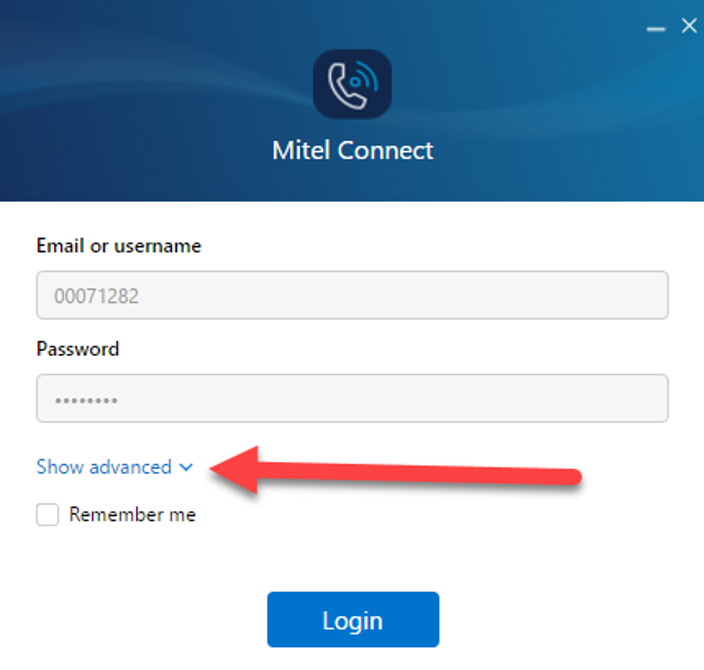
Step 1.
Select the
Show Advanced
drop-down.
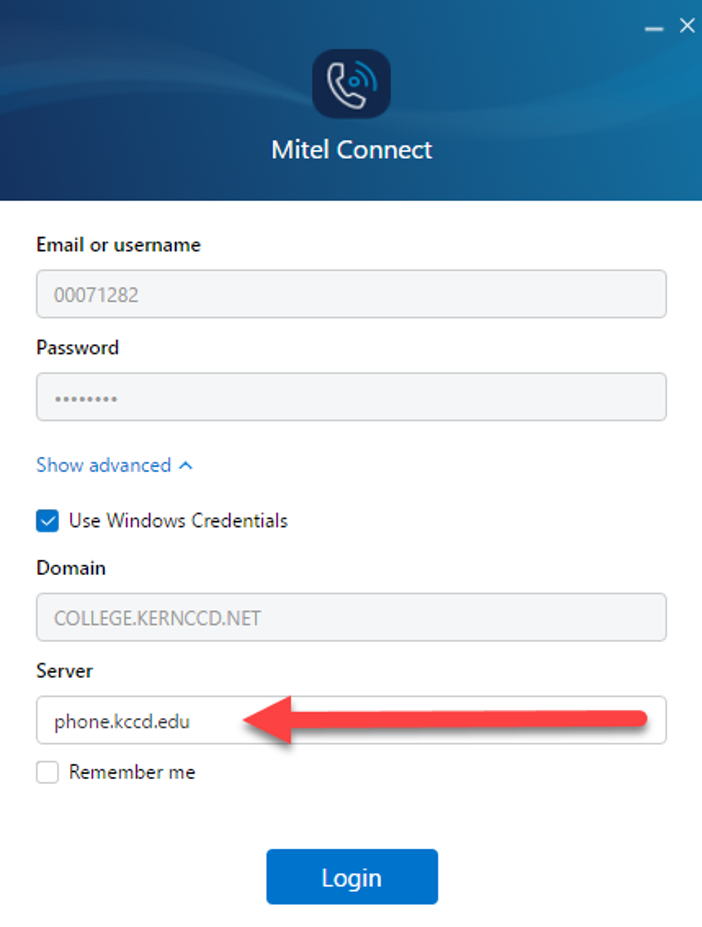
Step 2.
Change the server name from DO-SWD to
PHONE.KCCD.EDU
or add
PHONE.KCCD.EDU
to a new install.
If an error comes up after this press "esc" on your keyboard and the error will go away.
Sign in to leave feedback
0 reviews
Blank
Blank
Blank
Blank
Print Article
Deleting...